Market and Pending Orders
Test immediate entries and planned setups with market and pending order workflows during your historical simulation.
MetaTrader 4 backtesting software
A visual MT4 backtesting tool for Forex and Gold — market and pending orders, flexible money management, trade controls, and adjustable replay speed.
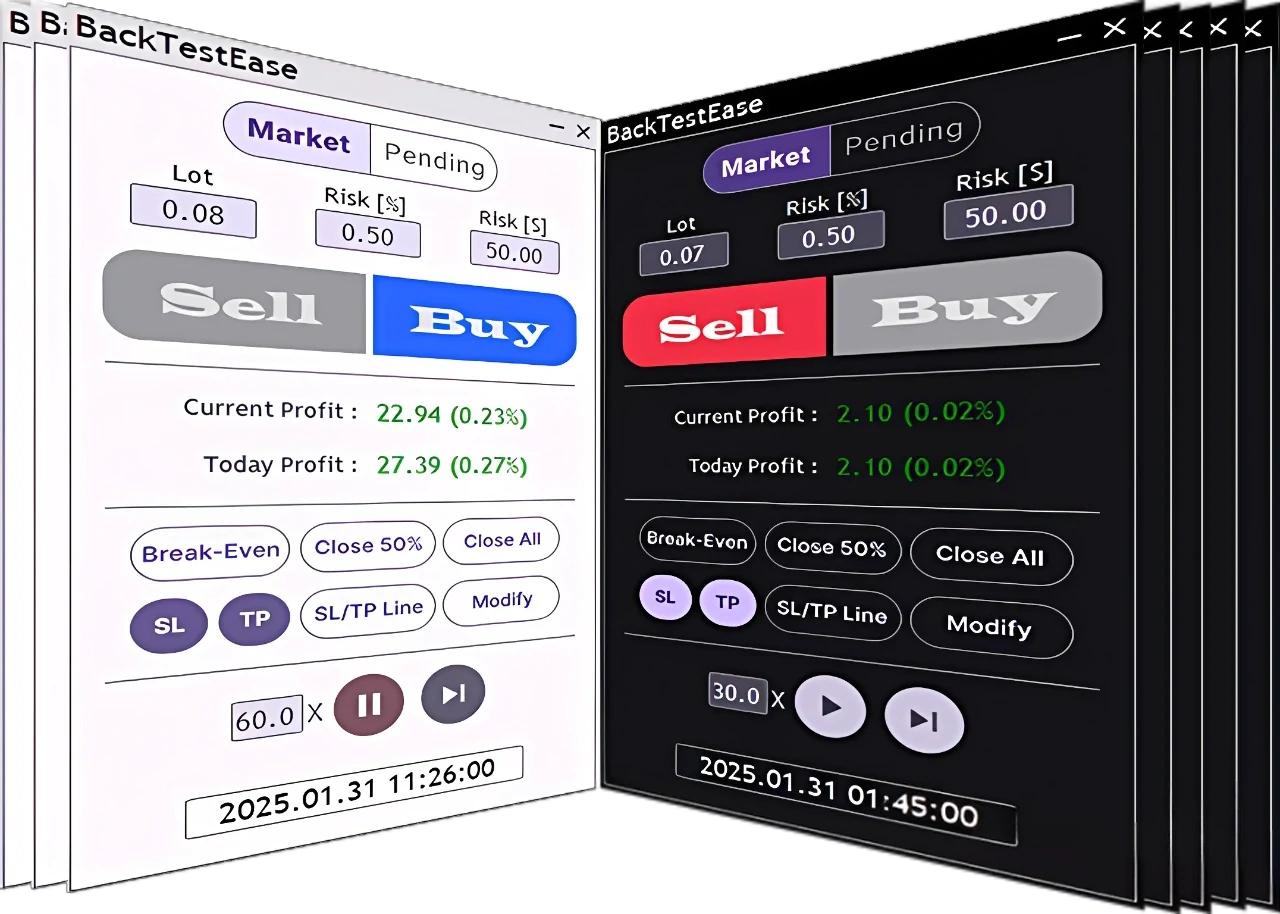
The testing desk
BackTestEase is a visual manual backtesting tool for traders who want to study historical price action and test how their strategies behave. Move through a market, place trades, manage open positions, and review performance before using an idea in live markets.
Instead of relying only on a spreadsheet or a basic tester report, you can interact with the test and make decisions using the same order and risk concepts used in your trading plan.
Instrument panel
Use the controls visible in the panel to test entries, manage risk, and examine your strategy at the speed that suits your workflow.
Test immediate entries and planned setups with market and pending order workflows during your historical simulation.
Compare lot-based, percentage-based, and dollar-risk settings so you can study how position sizing changes your results.
Manage trades with stop loss, take profit, break-even, partial-close, modify, and close controls where supported by your setup.
Slow the test down to inspect an entry, pause to review a setup, or speed it up when you want to cover more historical data.
Follow current and daily profit while the test runs and use the results to identify ideas that need more testing.
Use the interface style that fits your setup while working through your trading tests in MetaTrader 4.
Start free
Try BackTestEase before choosing a paid plan. The free plan lets you explore the interface and run limited tests so you can understand the workflow before upgrading.
Free-plan access is limited. See the exact symbols, date range, timeframe, and trade limits on the plans page.
Workflow
Start with a free download, configure MetaTrader 4, and test your strategy step by step.
Choose the free plan and download the software.
Install the tool and follow the setup instructions.
Set your risk, place orders, and move through historical data.
Study the outcome and refine your strategy for another test.
Plans
Start with limited free access, then choose Basic or Pro when you need more testing capacity and features.
Explore the interface and run limited tests before committing to a paid plan.
Get more room for regular Forex and Gold strategy testing with defined plan limits.
Choose the highest-access plan for broader testing and additional output features.
FAQ
BackTestEase currently supports MetaTrader 4 on Windows.
Yes. BackTestEase offers a free plan with limited access so you can explore the tool and run limited tests before choosing a paid plan.
BackTestEase provides market and pending order workflows for testing planned entries and immediate trade execution during a backtest.
Yes. You can slow down, pause, resume, or speed up the backtesting process to inspect setups or review more historical data efficiently.
No. Backtesting helps you evaluate a strategy using historical data, but it cannot guarantee future trading performance or profits.